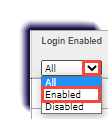
Disabling a Teacher/Admin Login November 02, 2022 20:27 Print Article Email Article Use this page to learn how to disable an educator's login to the system. Permission You need to be an Admin to complete the actions on this page. Click Teacher/Admin. Filter the Login Enabled filter to Enabled. Checkmark the educator's account. Click Disable Login. Articles in this section Teacher/Admin Overview Admin Account overview Super Teacher Account Overview Adding a New Teacher or Admin User Disabling a Teacher/Admin Login Viewing the Enrollments of a Teacher/Admin